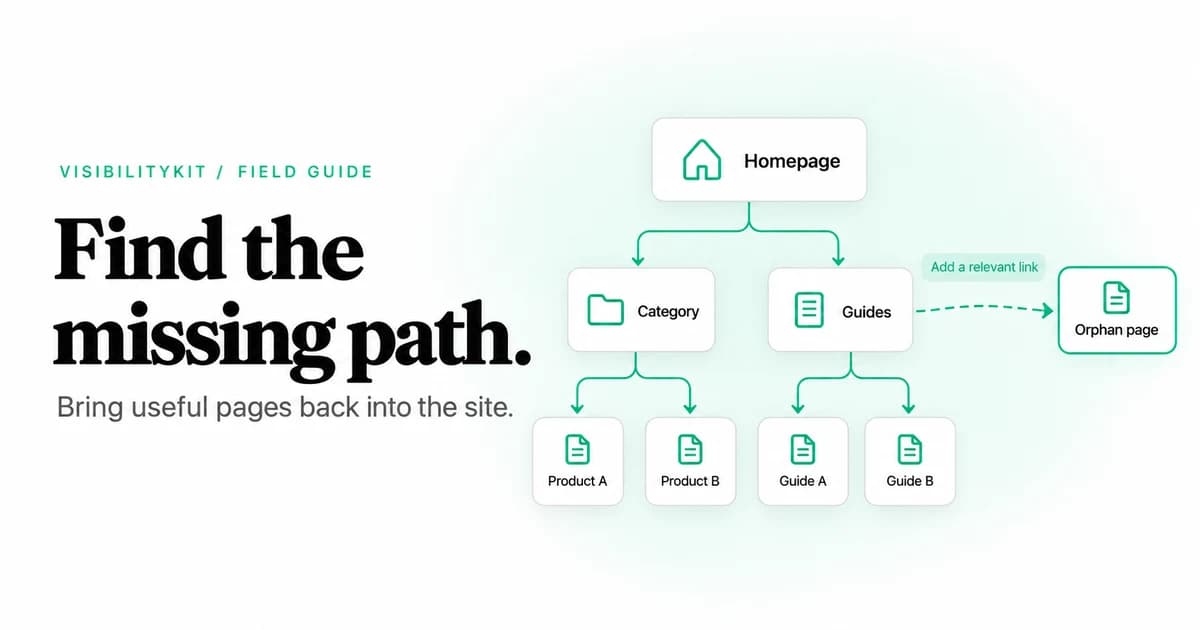
Orphan pages are pages that cannot be reached by following internal links from your website's main entry point, usually the homepage. Many have no internal links pointing to them. Others belong to an isolated group of pages that link to each other but have no connection to the rest of the site.
To find them, compare a crawl of the site's linked pages with a separate inventory of known URLs. Then rule out exclusions, blocked requests, redirects and rendering failures. A URL missing from one crawl is an orphan candidate, not a confirmed orphan.
This guide explains that comparison, provides a downloadable investigation worksheet and shows how to choose between linking, consolidating, excluding or removing a page.
Why orphan pages deserve investigation
A useful page can exist without a sensible route for visitors to find it. A product may disappear from its category after a merchandising update. An article may remain published after a redesign removes its archive link. A migration may preserve a URL while dropping the navigation that once led to it.
The immediate question is whether the page still serves a purpose. A valuable service page disconnected from the main site needs a different response from an intentionally separate campaign landing page.
Search engines may discover a page through a sitemap or external link even when it is disconnected internally. Being orphaned therefore does not prove a page is unindexed. Conversely, a page's presence in a sitemap does not establish that visitors can reach it through the site.
The Screaming Frog orphan-page tutorial also defines orphaning by the absence of an observed linking path from the crawl start. That distinction matters when auditing disconnected groups rather than individual zero-inlink URLs.
The two inventories you need
Build two lists independently:
- Linked crawl inventory: URLs discovered by following internal links from the chosen starting page.
- Known URL inventory: URLs collected from sitemaps, the CMS, historical records and other permitted sources.
The first tells you what the site's link structure exposes under your crawl settings. The second expands the set of pages you know to investigate. Neither list is guaranteed to be complete.
| Source | What it contributes | What it can miss or distort |
|---|---|---|
| XML sitemaps | URLs the site declares | Stale entries and pages omitted by sitemap configuration |
| CMS export | Published records and intended routes | Generated URLs, historical routes and non-CMS pages |
| Search Console | URLs appearing in available search reports | URLs with no reported activity or outside available report coverage |
| Analytics | Pages visited during the selected period | Unvisited pages, blocked collection and tracking variations |
| Server logs | Requested URLs during the retained period | Unrequested pages, incomplete retention and bot-generated noise |
| Historical crawl | Previously observed URLs | Pages published since the snapshot and old invalid routes |
Use exports you are authorized to access. Keep each URL's source so you can distinguish a current CMS page from a historical log entry that may no longer matter.
Step 1: run a crawl based on internal links
Start at the canonical homepage or the agreed entry point for the section. Record included subdomains, exclusions, URL limits, robots handling and rendering mode. For this baseline, keep sitemap imports and independent URL lists separate from linked discovery.
Check coverage before trusting the inventory. Does the crawler reach representative products, articles and category pages? Did it hit a limit? Are important links available only after JavaScript? A crawl that stops early cannot establish that every missing URL is disconnected.
Keep discovery sources separate
If your crawler imports sitemap or Search Console URLs automatically, preserve the discovery-source information. Otherwise an imported URL can appear in the results without showing whether an internal linking path exists.
Step 2: assemble and reconcile known URLs
Combine your independent sources in a sheet. Keep the original URL, source, intended page type and current publishing status. Remove duplicate records carefully.
Normalize only where you have evidence that two addresses represent the same resource. Host casing is safe to standardize, but path casing can matter. Tracking parameters may be removable; product-selection or pagination parameters may change the page. Redirects can help identify the current destination, but keep the original URL for diagnosis.
Do not silently convert every HTTP URL to HTTPS or strip every query string and trailing slash. Doing so can hide the very URL-handling issue you need to investigate. Record transformations explicitly and retain a column with the observed address.
Step 3: compare the inventories
For a simple spreadsheet check, place the reconciled known URL in column A and the linked crawl URLs in column A of a sheet named Crawled. In a candidate column, use:
=IF(COUNTIF(Crawled!A:A,A2)=0,"Investigate","Found in linked crawl")
This is an exact-list comparison after your URL reconciliation. It does not understand canonicals, rendering or graph reachability by itself. It also cannot reveal a page absent from every inventory.
If your tool provides graph analysis, check whether candidate pages or groups have a path from the chosen starting page. An isolated collection can have inbound links within the collection and still be unreachable from the homepage.
Step 4: rule out false positives
Before assigning a fix, inspect the candidate directly and answer these questions:
- Does the URL still exist? A historical URL that now returns a deliberate
404is not necessarily a current published page. - Is it within scope? An excluded subdomain or path cannot be assessed by a crawl that intentionally omitted it.
- Was the request blocked or unsuccessful? Access controls, rate limits and timeouts can explain missing data.
- Does it redirect? Investigate the final page and preserve the old route in the redirect inventory.
- Does rendering reveal the linking path? A failed JavaScript render is a coverage problem, not proof of orphaning.
- Is the page intentionally separate? Confirm campaign, account or temporary-page requirements with the owner.
Log an outcome for each candidate. Useful labels include confirmed disconnected, out of scope, historical redirect, request failed and intentional standalone page. These distinctions prevent an automated report from turning every unmatched URL into a deletion ticket.
Step 5: choose a fix that fits the page
Keep and link a useful page
Find a relevant source page that is already reachable. Add a contextual link or place the destination in the appropriate navigation hierarchy. Update the template if a whole class of pages is affected.
For example, if a current service page lost its category link during a redesign, restore the category relationship. Adding it to an unrelated footer list may create a path but still leave visitors with poor navigation.
Consolidate a duplicate or superseded page
Review whether another page meets the same need more completely. When a page has genuinely moved or been replaced, choose a relevant destination and update the links you control. Use the redirect-chain workflow to avoid adding another detour to an existing history of moves.
Keep a deliberate standalone page
Some landing pages have a specific campaign purpose. Document that decision rather than forcing them into general navigation. Decide indexability separately; internal linking and indexing directives solve different problems.
Remove a page that no longer serves a purpose
Check traffic, dependencies and any relevant historical signals before removal. Do not redirect unrelated retired content to the homepage just to eliminate an error count. If you need to prevent indexing while keeping a page available, follow Google's noindex guidance; blocking the crawl can prevent the directive from being seen.
Step 6: verify reachability, not just the new link
After deployment, fetch the edited source and confirm the link is present. Fetch the destination and check its intended content. Then run another crawl from the same entry point using comparable settings.
The strongest acceptance test is that the page can now be discovered through the intended path. A manual request to the destination proves the page exists; it does not prove the website leads to it.
For an isolated group, confirm that the new connection reaches the pages you intended, including any pagination. Preserve the previous inventory and fresh evidence so you can explain which pages changed and which remain intentional exceptions.
The difference between two URL lists starts the investigation. A confirmed orphan finding requires evidence about scope, successful fetching and the missing internal path. A successful fix restores a useful path and passes a fresh linked crawl.
Use Crawler as part of the investigation
VisibilityKit Crawler helps inspect the crawled link graph and track findings through assignment and verification. Combine that evidence with the independent inventories above. This workflow does not assume the app automatically performs every CMS, log or spreadsheet comparison.
Use the internal linking audit to choose useful source pages for a repair. The technical SEO audit checklist helps prioritize the work against access, canonical and rendering problems elsewhere on the site.
Orphan-page questions
Frequently Asked Questions
Check the paths to your important pages
Inspect the site graph, record the fix decision and verify the changed URLs with VisibilityKit Crawler.
Explore Crawler