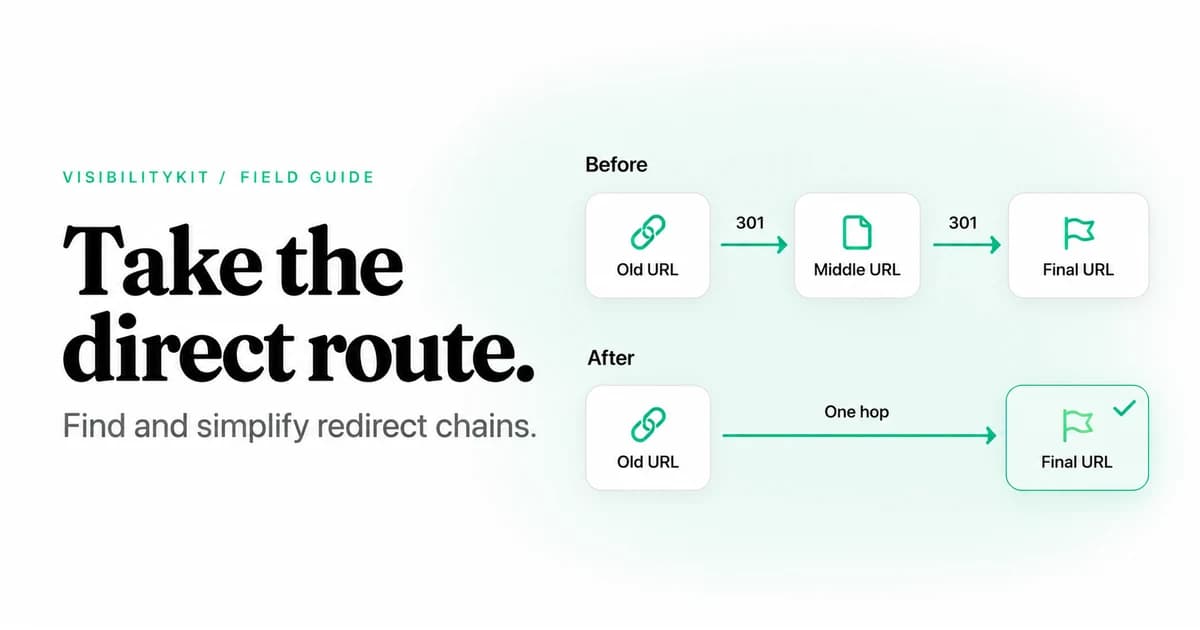
A redirect chain occurs when a URL redirects to another URL that also redirects before reaching a final response. To fix it, map the full sequence, identify the correct destination, update the redirects you control to go there directly, and change internal links to use that final URL. Then test the original URL and the destination after deployment.
For example, /old-guide might redirect to /guides/old-guide, which redirects again to /guides/current-guide. The repair is usually to send both historical URLs directly to the current guide, while linking internally to the current address.
Use the redirect audit worksheet to record each path, its owner and its verification result. The examples in this article are illustrative, not measurements from a live site.
Redirect chain, single redirect or loop?
| Pattern | Example | What to investigate |
|---|---|---|
| Single redirect | A → B → final response | Whether B is the right destination and the redirect is intentional |
| Redirect chain | A → B → C → final response | Whether A can go directly to C and internal links can use C |
| Redirect loop | A → B → A → repeats | Conflicting rules that prevent the request from completing |
| Broken redirect | A → B → 404 | Whether the destination was removed or the mapping is wrong |
A chain can eventually deliver the correct content. A loop never settles on a final page. A single redirect can be necessary for a moved page, a hostname change or HTTPS normalization; the goal is to remove unnecessary work, not every redirect.
MDN's HTTP redirection guide explains how HTTP redirects use a response status and Location header. Each additional HTTP redirect requires another request. The impact depends on the network, caching and server behavior, so avoid attaching an invented fixed delay to every hop.
Why redirect chains appear
Chains often accumulate through individually reasonable changes. A site moves to HTTPS, changes its hostname, adopts a new URL structure and later renames a product. If each new rule points to the previous destination rather than the current final page, old entry URLs acquire extra hops.
They can also cross systems. The CDN handles the hostname, the web server adds a slash and the application redirects an old route. No single team may have documented the complete path.
Common places to investigate include:
- Old product and category slugs after catalog changes.
- HTTP and alternate-host versions of popular landing pages.
- Redirect maps carried forward from earlier migrations.
- Links in shared navigation that still use historical addresses.
- Campaign and tracking links managed by a different service.
Map the actual responses before changing a rule. Otherwise, a “cleanup” at one layer can conflict with another layer and create a loop.
What redirect chains mean for SEO
Longer paths introduce more requests and more places for a failure to occur. They also make it harder to reason about which URL internal links, sitemaps and canonical signals are supporting.
Google's site-move guidance recommends redirecting to the final destination directly. Treat that as a design goal, not a reason to claim that every extra hop causes a fixed percentage of ranking loss.
A simplified redirect can still be wrong if it leads to an unrelated page, an error template or a destination that is unintentionally excluded from indexing. Inspect the final content as part of the repair. Hop count alone is an incomplete acceptance test.
Step 1: find redirecting URLs and their sources
Run a crawl and collect redirecting URLs, response codes, target URLs and source pages. Include historical URLs from a migration map or other available inventory; a linked crawl may never request old addresses that no longer appear on the site.
Distinguish between two repair tasks:
- Update internal links you control. Point current navigation and content to the correct final URL.
- Maintain useful historical routes. Keep old bookmarks and external links working through a suitable redirect.
These tasks complement each other. Removing a redirect before updating sources can break links. Updating internal links alone leaves the historical chain unchanged.
Step 2: inspect every hop
For an individual URL you own or are authorized to test, this command follows HTTP redirects and prints response headers while discarding the body:
curl --silent --show-error --location --max-redirs 10 \
  --dump-header - --output /dev/null \
  'https://www.example.com/old-guide'
The example uses a GET request. A HEAD-only check can behave differently on some servers, so compare the method with the browser or crawler behavior you are investigating. The --max-redirs value is a local safety bound for this test, not a claim about a search engine's limit.
For a compact summary:
curl --silent --show-error --location --max-redirs 10 \
  --output /dev/null \
  --write-out 'Final URL: %{url_effective}\nStatus: %{http_code}\nRedirects: %{num_redirects}\n' \
  'https://www.example.com/old-guide'
These commands do not execute JavaScript or HTML refresh redirects. Use a browser's network tools and rendered-page inspection when those are involved. Record a failed command or redirect-limit error as a failed investigation, not as a completed path.
Step 3: choose the right final destination
The final URL should satisfy the purpose of the original resource. For a renamed article, that is usually the current article. For a retired product, it may be a genuine replacement, if one exists. An unrelated homepage is not automatically an appropriate fallback.
Before editing the mapping, check the destination's response, visible content and intended indexability. Review whether it redirects again under other host, path or parameter variants. Coordinate with the owner of any external service involved in the route.
Use permanent redirects for permanent moves and temporary redirects for genuinely temporary behavior. Google documents 301 and 308 as permanent redirects, and 302 and 307 as temporary options. Choose the method-handling behavior required by the application; do not apply a generic page-migration rule to form submissions or API endpoints without reviewing their semantics.
Step 4: flatten the mapping and update references
For this illustrative mapping:
Before:
/old-guide         → /guides/old-guide → /guides/current-guide
/guides/old-guide  → /guides/current-guide

After:
/old-guide         → /guides/current-guide
/guides/old-guide  → /guides/current-guide

Current internal links:
/guides/current-guide
The old paths continue to work, while each reaches the final page directly. Update references in navigation, body links, canonical declarations and sitemaps where those references should identify the current URL.
Make the change in the layer that owns the behavior. A CMS redirect table, CDN rule and application redirect can all affect the same request. Document the order and test for overlap before rollout.
Do not flatten away required behavior
Authentication, regional routing, tracking and temporary experiments can have requirements beyond SEO. Confirm the intended behavior with the owner before replacing those routes with a permanent redirect.
Step 5: verify a matrix of entry URLs
Test the original problem URL and the variants relevant to your site. Use a small matrix instead of assuming one successful request covers everything.
| Entry to test | What the fresh check should establish |
|---|---|
| Original historical path | Reaches the agreed final destination through the expected redirect |
| Intermediate historical path | Still works without introducing another detour |
| Current canonical URL | Returns the intended content directly |
| HTTP or alternate hostname | Preserves the intended path while normalizing the URL |
| Relevant query-string variant | Preserves or removes parameters according to the agreed requirements |
| Edited source page | Links directly to the intended current URL |
Also inspect neighboring URLs that should not match the new rule. A broad pattern can accidentally redirect valid content. If a temporary server failure prevents a conclusive check, keep the outcome pending and retry.
Keep the repair evidence with the finding
A useful record includes the original chain, expected final URL, owner, rule location, deployment time and fresh result. For a shared-template issue, include representative sources and the total scope you actually checked.
VisibilityKit Crawler keeps findings with owners, notes and verification evidence. Use it to follow the issue through the audit workflow, and use direct HTTP or browser inspection where a particular rule needs deeper investigation. The application does not change your server rules for you.
A redirect-chain fix is complete when the original entry URLs work as intended, internal links use the right destination and the final page contains the expected content. A smaller hop count is useful evidence, but it is not the entire result.
Continue with the internal linking audit to find outdated source links. Use the technical SEO audit checklist to prioritize redirects alongside indexing and rendering problems. If a migration also disconnected useful pages, run the orphan-page investigation.
Redirect-chain questions
Frequently Asked Questions
Verify the route after the fix ships
Keep your crawl finding, owner and fresh-check result together in VisibilityKit Crawler.
Explore Crawler